With a printed menu
New prices mean new labels.
Worn pages mean another reprint.
Explaining sold-out dishes again and again.
YOUR RESTAURANT’S NEXT MENU
Prices change. Dishes come and go. Your QR code stays. Update your menu whenever you need to and receive orders through WhatsApp.
No credit card · Every feature included
A FRESH TAKE ON AN OLD ROUTINE
New price stickers. Worn-out pages. Another round of printing. Spend less time dealing with your menu and more time running your restaurant.
New prices mean new labels.
Worn pages mean another reprint.
Explaining sold-out dishes again and again.
Change a price. Your menu updates.
Keep the same menu link.
Show or hide items based on availability.
Price and item changes do not require a new QR code as long as your menu URL stays the same.
MORE THAN A MENU
Practical tools for your restaurant. A clear, inviting menu for your guests.
Add photos, descriptions and prices so guests can see what they are choosing. Make it yours with your restaurant’s logo.
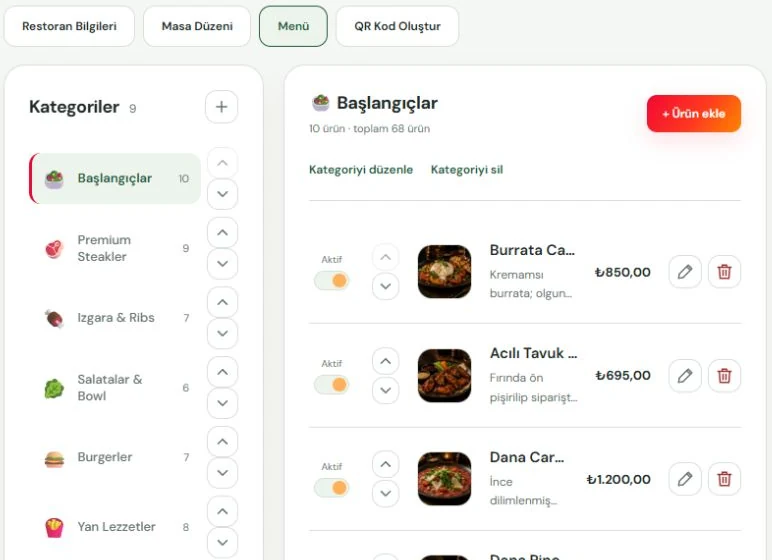
Create, edit and reorder categories and dishes. Move items between categories and hide sold-out dishes without deleting them.
Add allergen information, spice levels and preparation times. Give guests more information to help them choose.
Manage the menus of your assigned restaurants from one manager account. Switch between locations with ease.
Answer ‘What’s on the menu?’ with a link. Share it on WhatsApp, on social media or on your website.
Create a general menu QR or table-specific codes. Choose whether to show your name, logo, caption and table details.
Photos · Prices · Categories · Allergens · Spice levels · Preparation times
A SHORTER PATH TO ORDERING
Let guests send their selections through WhatsApp instead of waiting for another trip to the table. Give your team more time for hospitality and service.
Scan a QR code or open the link you shared.
Add dishes to the cart and choose quantities.
The guest sends the prepared order message to your business.
WhatsApp messages are not sent automatically. Order confirmation and follow-up happen directly between your business and the guest.
Hello, I’d like to place an order.
2 × Steak Burger
1 × Homemade lemonade
GIVE EVERY TABLE ITS OWN ADDRESS
Set up your restaurant’s areas and tables. Create a QR code for each table; orders from valid table links include the area and table in the WhatsApp message.
Renaming an area or table means regenerating the relevant QR code.
DON’T JUST READ ABOUT IT
Use the real RDA Steakhouse sample menu inside this phone. Explore categories, open photos and add dishes to the cart.
Scroll and tap inside the phone.
Open the menu full screenIf the menu does not display here, open it directly.
Not a screenshot. A real menu.
NO MAZE OF PLANS
No need to work out which plan unlocks what. The menu management and QR tools you need, together in one place.
Category and item management
Photos, allergens and preparation times
Instant price and visibility updates
WhatsApp ordering support
Areas, tables and QR code management
Manage multiple restaurants
Use every feature free for one month. Build your menu, try it out and then decide.
GOOD QUESTIONS. CLEAR ANSWERS.
No. Guests open your QR code or menu link and view the menu directly in their browser.
No. Item and price updates do not require a new QR code while your menu URL stays the same. Changing the menu’s short address or an area or table name means regenerating the relevant codes.
Guests add items to the cart. The menu prepares a message with items and quantities, plus area and table details when a valid table link is used. The guest opens WhatsApp and sends it to your business. There is no automatic confirmation or payment collection.
Try every feature for one month and create your own restaurant and menu. Verify your phone number to get started; no credit card is requested.
No. Temporarily hide an item from the menu and make it visible again when it is available.
Yes. Manage the menus of multiple restaurants assigned to you from the same manager account and switch between them.
LET’S START WITH HELLO
Get in touch. Let’s talk about RDA QR Menu for your restaurant.
info@rda-software.comRESTORAN YÖNETİCİ PANELİ
Giriş yapmak için kayıtlı telefon numaranızı girin.
Devam ederek giriş için SMS almayı kabul edersiniz. Numaranız, spam ve kötüye kullanımın önlenmesi amacıyla Google tarafından işlenir.
numarasına gönderilen 6 haneli kodu girin.
Telefon numaranız doğrulandı.